Subscribe to GEN
Login to GEN

GEN designs, supplies and maintains Synology storage for businesses, charities, schools and public sector bodies across the UK: RackStation arrays in a comms room, DiskStations in branch offices, replication between sites, and the backup estate that hangs off all of it. Synology is the only Network Attached Storage vendor we deploy, and we run our own production storage on it, which is a rather different proposition from a reseller who has read the datasheet.
Support is chargeable engineering work at our published rates, with no contract and no minimum term. If you are looking for free help with a NAS at home, this is not that service, and the Synology support site will serve you far better.
We work for organisations, not households. That includes the small end: a four bay DiskStation holding the shared drive for a six person office is a business system, and we support it exactly as seriously as a twelve bay RackStation in a data centre, because the accounts, the case files and the drawings are on it either way.
What we do not do is domestic support. If the device is a two bay unit in a spare room holding films and family photographs, our rates will not represent value to you, and we would rather say so plainly than take the money. Synology's own support and the community forums are excellent, and they cost nothing.
Whether a volume has dropped, a DSM upgrade has stranded a package, replication to your second site has quietly stopped, or you simply need the estate looked at properly by somebody who knows it, our specialists pick the case up and stay with it.
Cover is available pre-pay or pay as you go, at service levels from a next business day response through to a thirty minute guaranteed response 24 hours a day. We are a Synology Partner, and we run Synology at scale for our own storage and replication. Infrastructure maintenance and monitoring can be wrapped around the same hardware so faults are found before anybody reports them.
With so many years invested in Synology, internally and for our clients, we hold spares rather than waiting on a distributor: complete units, power supplies, backplanes and mainboards, and we can carry out component level repairs on some models. Where equipment has passed out of vendor support we can usually keep it running; see legacy system support for what that involves.
Fault work on production storage, taken by an engineer who has run the same equipment in anger.
Specified against the workload rather than the price list, then built, racked and handed over documented.
Keeping the estate healthy between incidents, which is where most of the value sits.
For immediate support, raise a ticket on the HelpDesk. To discuss maintenance and service pricing, please contact us.
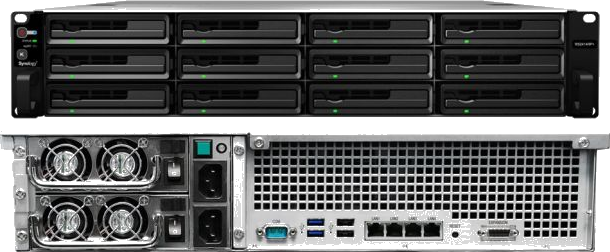
The higher end RackStations provide a power efficient, rock solid and highly scalable platform, with clearly defined upgrade paths in both capacity and performance as your needs grow. Internally we use RackStations for our own storage and for block and file level storage behind our virtualisation platforms, and high availability is dependable enough for mission critical storage and services.
They are designed and manufactured to a very high standard, and they are not cheap for that very reason, but in our experience nothing in the industry is better. Synology have matched what we look for from the start: quality down to the component, a catalogue of features built in, and security designed in rather than bolted on. Our first was a DS101 in 2004, and it is still on display in our head office.
Synology's DiskStation Manager (DSM) provides a comprehensive set of built-in services, all managed from one web interface. For a business that matters commercially: a good deal of what would otherwise be separately licensed server software is already paid for in the chassis.
LDAP that syncs between Synology units and other LDAP systems, RADIUS to extend it to routers and VPN appliances, and token based single sign-on and OAuth for your applications.
Hyper Backup to back up or synchronise between servers, and Active Backup for Business for remote computers, servers, shares, VMware and Hyper-V.
A full bind9 DNS server managed from the GUI or the command line, a VPN server for the common protocols, and Web Station for hosting.
CalDAV and CardDAV servers to centralise scheduling and contacts across devices, and File Station for browsing the NAS from a web browser.
Docker containers and Virtual Machine Manager running on the RackStation itself, and Surveillance Station with support for up to 144 cameras.
Antivirus at no charge, Security Advisor reviewing the unit's settings, Storage Analyser reporting by user, share and protocol, and a flexible task scheduler.
Beyond the package centre and its third party catalogue, DSM is Linux underneath: if something you need is not available as a package, you can install it yourself with dpkg.
If you need a NAS you will almost certainly need synchronisation: automated copies from NAS to NAS, server to NAS, or many other configurations. Our own core storage runs exactly this way. Other systems back up their data and images to the core, in the knowledge that those backups will be replicated to a third site within the hour.
The same pattern scales down comfortably to a single site with an off-site target, and it is the design most of our customers end up with. See GEN Storage if you would rather we held the second copy for you.
Where an organisation would rather run the estate itself, we teach it. Three graded courses take an engineer from first setup through to disaster recovery, delivered remotely or on site. See Synology training for the course outlines.
No. GEN provides Synology support to businesses, charities, schools and public sector bodies only. We do not take on domestic installations, and we do not support a consumer NAS sitting in a home. If your Synology is a personal device, Synology's own support channels and the Synology community forums are the right place to start, and they are free. Our engineers are chargeable, and a home user is very rarely well served by paying commercial engineering rates.
No. Every hour our engineers spend on a Synology, whether that is a fifteen minute DSM question or a three day array recovery, is charged at our published rates, in GBP and exclusive of VAT. There is no free triage, no free diagnosis and no free advice line. What you get in exchange is a UK based specialist who owns the case, a guaranteed response time against your chosen service level, and a written record of everything done.
No. There is no support contract, no minimum term and no notice period. You place a sum on account and draw against it, or you settle on invoice. Hours you buy do not expire, and hours you do not use carry over. Our published rates set out the day, night and out of coverage charges in full.
The full business range: RackStation RS units and their RX and RXD expansion shelves, the SA and UC series, and the plus and value DiskStation models where they are deployed in an office, branch or edge role. We hold parts and working knowledge for hardware back to 2014, and we will take on earlier equipment where the customer accepts that spares are finite.
Yes. Degraded and failed SHR, SHR-2, RAID 1, 5, 6 and 10 arrays, Btrfs and ext4 volumes that will not mount, controller and backplane faults, and units that no longer boot. Recovery is specialist work charged by the hour with no guaranteed outcome, and the first thing we will tell you is to stop touching the unit. Where the array is beyond software recovery we will say so rather than run the meter.
Yes. DSM version upgrades across a fleet, package and database migrations, migration from an ageing DiskStation to a RackStation, and head unit swaps that preserve the storage pool. We test the upgrade path against the packages you actually run before touching production, because a DSM upgrade that strands a business critical package is not a success.
Yes, and a good part of our Synology work arrives that way. We audit what is there, document it, correct what is wrong, and take on maintenance from that point. We do not require the equipment to have been bought from us.
Yes. Cover runs 24 hours a day across five engineering shifts, with handovers conducted live between two engineers rather than passed as written notes. Emergency work carries a minimum charge of one hour and starts from the moment we accept the ticket.
Yes. We specify, supply, rack, configure and maintain Synology hardware, and we hold a substantial stock of spares including complete units, power supplies, backplanes and mainboards. For mission critical sites we will hold a cold spare configured and ready to swap.
The United Kingdom. Our engineers are in-house and UK based, our data centres are in the UK, and the specialist who takes your case is the specialist who works it. There is no offshore first line filtering the ticket before a technical person sees it.
Our engineers are UK based and in-house, with no offshore outsourcing: the specialist who takes your case is the specialist who works it, and they hold the production experience to match the equipment in front of them. Risk is assessed before anything is changed, the SAPR method is applied to every fault, and five shifts a day mean an overnight handover is a conversation between two engineers rather than a note left in a ticket. Our AI runs on our own hardware in our own data centres, and it never writes a word you read.
There is no support contract, no minimum term and no notice period. You buy hours at our published rates, use them when you need them, and what you do not use carries over. How GEN support works sets all of it out in full.